2021/05,江端さんの忘備録

(昨日の続きです)

(Continuation from yesterday)

私は、"kobore.net"というドメイン名のオーナーです。

I am the owner of the domain name "kobore.net".

ですので、"kobore.com","kobore.co.jp"などのドメイン名の売り込みのメールが多いです("kobore.jp"というのはオーナーがいるようです)。

So, I get a lot of emails selling domain names like "kobore.com", "kobore.co.jp", etc. ("kobore.jp" seems to have an owner).

そもそも、私の、"kobore.net"は、IPネットワーク実験用に入手したもので、今のような運用(ブログとかコラムの掲載)は想定していませんでした。

To begin with, my "kobore.net" was obtained for IP network experiments, and was never intended to be used as it is now (for posting blogs and columns).

しかし、"kobore.net"を持っていると、サブドメイン名が作り放題です。

However, I have "kobore.net", so I can create as many subdomain names as I want.

■wp.kobore.net WordPress用のドメイン名

- wp.kobore.net for WordPress

■tech.kobore.net 技術系の実験用のドメイン名

- tech.kobore.net for technical experiments

あと、自分でドメイン名を持っていると、covid19@kobore.net やら、blockchain_20201010@kobore.net など、必要な時に作って、必要がなくなれば捨てることができますので、便利です。

Also, it is convenient to have my own domain name, such as covid19@kobore.net or blockchain_20201010@kobore.net, because I can create it when I need it, and discard it when I no longer need it.

-----

私、個人用の公開メールアドレスを作って持っているのですが、これもドメインを持っていると便利です。

I have created and have a public email address for my personal use, and it is also useful to have a domain name.

時々、心または脳に不自由のある人からメールが送られてきて、イヤな気分になることがあるのですが、これが3回続けば、私は、躊躇なく、自分の公開用メールアドレスを変えてしまいます。

Sometimes I get emails from people with mental or cerebral disabilities that make me uncomfortable, but after three times, I will not hesitate to change my public email address.

私は、

I am a man who can

―― 1人の不快なメールを読めなくする為に、それ以外の複数の人との連絡手段を切り捨てる

"cut off all other means of communication with multiple people in order to make one unpleasant email unreadable"

ことに、抵抗がない人間です。

and, is not afraid of such things.

これを実行すると『スパムメールが一掃できて気持ちが良い』という副次的効果もあります。

This has the side effect of making me feel good that I've wiped out all the spam.

そういえば、私、携帯電話(スマホ)の電話番号の変更でも同じようなことしていました。

Come to think of it, I did the same thing with changing the phone number of my cell phone (smartphone).

但し、変更後のメールアドレスは、自分のWebサイトに掲載していますし、さらに、1ヶ月後くらいに、こっそりと、元のメールアドレスに戻したりすることもあります。

However, the new email address will be opened on my website, and I may change it back to the original one in a month or so, secretly.

-----

自分がオーナーであるドメイン名を持っていると、こういう小手技を使えます。

If you have your own domain name, you can use these little tricks.

こういうことを楽しめそうという方は、ドメイン名を運用してみることを、お勧めします。

If you think you can enjoy this kind of thing, I recommend that you try get a domain name.
2021/05,江端さんの忘備録

私のメールボックスの中に、『優良中古ドメインがあなたのものに?!』という広告を見つけました。

In my mailbox, I found an ad that said, "A quality used domain name can be yours!"

―― 優良中古ドメインって何?

"What is a good used domain name?"

と思って調べてみたのですが、つまるところ、

Looking them up and I came to know,

■現在の商標のような取扱いをされていない時代に取得されたドメインで、

- A Domain name that was acquired at a time when they were not treated as trademarks

■そのドメインの管理者がいなくなってしまい、

- The administrator of the domain name is now unknown,

■現在であっては、なかなか手に入れ難そうな(普通名詞に近い)ドメイン

- the domain name that seems to be hard to find nowadays (almost like common nouns)

のようです。

-----

例えば、

For example,

chuukosha.jp 中古車(Used car)

effort.jp 努力

kenko.jp 健康(health)

class.jp クラス

otsukai.jp おつかい(errand)

background.jp バックグラウンド

なるほど、これは確かに、優良で中古のドメイン名です。

Well, these are indeed good, and used domain names.

-----

always3.jp 映画『ALWAYS 三丁目の夕日 '64』

always3.jp The movie "ALWAYS Sunset on Third Street '64

bananakayo.jp 映画『こんな夜更けにバナナかよ 愛しき実話』

bananakayo.jp The Movie "This Late at Night, Do you give me Banana : A True Story

このように、映画の広告で使われたドメイン名もあるようです。

Thus, it seems that some domain names were used in movie advertisements.

(続く)

(To be continued)

2021/05,江端さんの技術メモ

Ubuntu Desktop 18.04でClamAVによるウィルスチェックを実行する!

を参考にして、ClamAVを、Amazon Lightsailにインストールしたら、(それが原因かどうかは、今一つはっきりしないんだけど)以下のような問題が発生した。

https://wp2.fem.jp/%e6%b1%9f%e7%ab%af%e3%81%95%e3%82%93%e3%81%ae%e6%8a%80%e8%a1%93%e3%83%a1%e3%83%a2/post-3011/

けど、お勧めされたので、AWS EC2(Ubuntu Desktop 18.04)の方には、週明けにインストールする予定。

(T.B.D.)

2021/05,江端さんの技術メモ

私は小心者なので、サーバにログインできなくなるだけで、青ざめてしまいます。

今日も、Amazon lightsailにsshログインできなくなって、パニックになっていました。

原因は、ウイルスチェックツールのClamAVのインストールと、AWS inspectorのインストール(Amazon lightsailでは動かない)が原因と考えられました。

『こういう場合、あわてて動くとロクなことがない』は経験則ですので、まずは、Amazonlightsailの内部情報をコンソールから見る方法をググってみました。

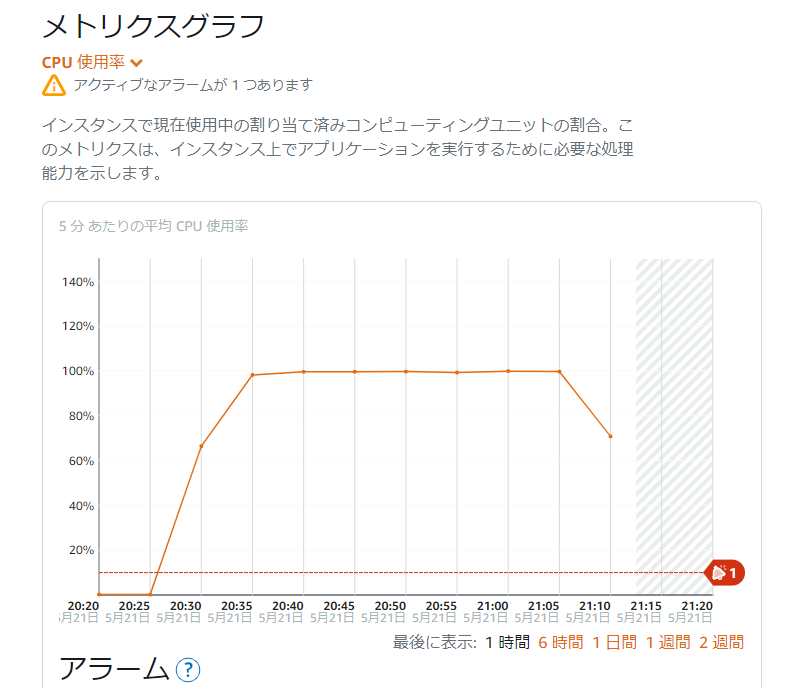
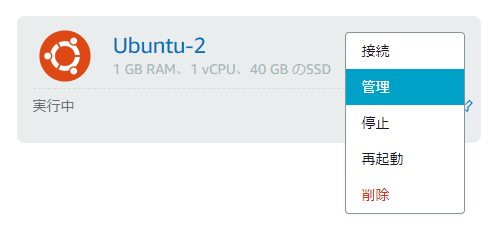
から「メトリクス」を選ぶと

CPUが100%のまま動いているグラフが出てきます。

間違いなく、ウイルススキャンがCPUを喰い捲っている、と思いましたので、いつかは下がるはず、と1時間くらい待ってみたところ、落ちてきました(ケースによっては、3時間、6時間コースもあるようなので、しばらく放っておく勇気が大切です)。

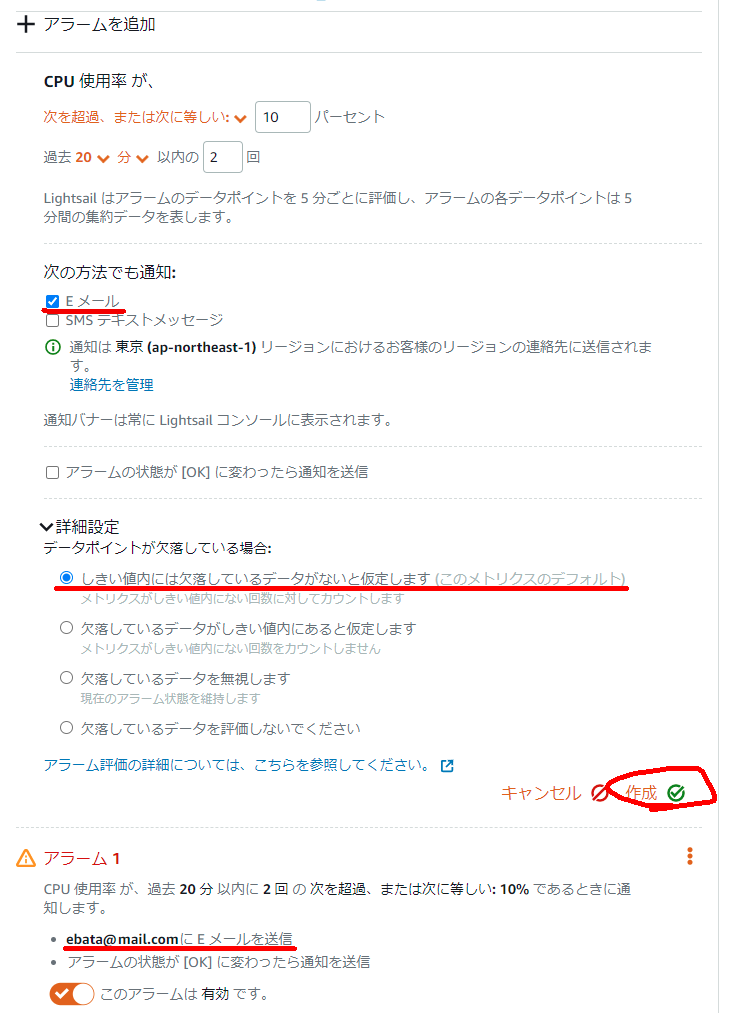
で、この間に、「使用率」と記載されているところをクリックして、「+アラームの追加」をクリックして、こういう状態になったらアラートが飛んでくるように設定しておきました。私の場合、以下のように設定しておきました。」

で、CPUも落ちついてきて、sshログインができるようになったので、早速パッケージのアンインストールを実施しました。

ubuntu@ip-123-45-67-89:~$ sudo apt-get remove --purge clamav clamav-daemon
Reading package lists... Done
Building dependency tree
Reading state information... Done
The following packages were automatically installed and are no longer required:
clamav-base clamav-freshclam clamdscan libclamav9 libtfm1
Use 'sudo apt autoremove' to remove them.
The following packages will be REMOVED:
clamav* clamav-daemon*
0 upgraded, 0 newly installed, 2 to remove and 0 not upgraded.
After this operation, 1881 kB disk space will be freed.
Do you want to continue? [Y/n] y
(Reading database ... 196083 files and directories currently installed.)
Removing clamav (0.103.2+dfsg-0ubuntu0.20.04.2) ...
Removing clamav-daemon (0.103.2+dfsg-0ubuntu0.20.04.2) ...
Processing triggers for man-db (2.9.1-1) ...
(Reading database ... 196045 files and directories currently installed.)
Purging configuration files for clamav-daemon (0.103.2+dfsg-0ubuntu0.20.04.2) . ..
Processing triggers for systemd (245.4-4ubuntu3.6) ...

で、サービス状態を確認したら、まだ生き残っていたので、これも力付くで停止

ubuntu@ip-123-45-67-89:~$ systemctl list-unit-files | grep clamav
clamav-freshclam.service enabled enabled
ubuntu@ip-123-45-67-89:~$ sudo systemctl stop clamav-freshclam

さらに、AWS inspectorも強制アンインストールを実施

ubuntu@ip-172-26-7-19:~$ systemctl list-unit-files | grep aws
awsagent.service generated enabled

ubuntu@ip-172-26-7-19:~$ sudo apt-get remove --purge awsagent
Reading package lists... Done
Building dependency tree
Reading state information... Done
The following packages were automatically installed and are no longer required:
clamav-base clamav-freshclam clamdscan libclamav9 libtfm1
Use 'sudo apt autoremove' to remove them.
The following packages will be REMOVED:
awsagent*
0 upgraded, 0 newly installed, 1 to remove and 0 not upgraded.
After this operation, 0 B of additional disk space will be used.
Do you want to continue? [Y/n] y
(Reading database ... 196040 files and directories currently installed.)
Removing awsagent (1.1.1677.0-102677) ...
Stopping awsagent-agent service:
Stopping awsagent (via systemctl): awsagent.service.
Removing awsagent-agent service:
Killing existing AwsAgent Updater Cron Jobs:
Found existing awsagent updater cron job PID: 1462
Processing triggers for systemd (245.4-4ubuntu3.6) ...
(Reading database ... 196024 files and directories currently installed.)
Purging configuration files for awsagent (1.1.1677.0-102677) ...
dpkg: warning: while removing awsagent, directory '/opt/aws/awsagent/etc' not empty so not removed

最期に、sudo reboot をして、起動を確認しました。


教訓: メモリ1G程度の Amazon lightsailに、あまり凝った仕組みを組込むな


2021/05,江端さんの忘備録

趣味と仕事の両方で「メカ」に携わっている長女に、

I asked to my senior daughter, who is involved in "mechanics" as both a hobby and a job,

―― スノータイヤからノーマルタイヤへの交換やってみるか?

"Do you want to try changing from snow tires to normal tires?"

と尋ねてみたら、『やりたい』と言いましたので、私は一切手を出さずに、口で指示だけをして、ずっと見守っていました。

She said "I do try it", so I didn't help but watch her, just gave her verbal instructions.

なかなか、手際が良くて、ちょっと驚きました。

I was a little surprised at how well she did it.

-----

実際のところ、タイヤ交換は、機材さえ揃っていれば、そんなに難しくありません。

In fact, changing a tire is not that difficult, as long as you have the right equipment.

少なくとも、英語しゃべるより簡単だし、スマホの操作よりも簡単です。

At least it's easier than speaking English, and easier than operating a smartphone.

こちらが、私の記録用の映像なのですが(YouTubeに繋がります) ――

Here's my video for the record (it leads to YouTube) --.

娘の映像を記録しておけば、もっとPV上がるな ―― と気がついた時は、作業が終っていました。

If I record my daughter's video, I'll get more PV...and when I realized that, the work was done.

2021/05,江端さんの忘備録

今日、一昨年度、高視聴率だったドラマのカップルの主人公が、結婚を発表しました。

Today, the main characters of a couple of dramas that had high ratings the year before last announced their engagement.

私には、江端家用のLINEで連絡が来ました。

I was contacted by LINE for the Ebata family.

もちろん、結婚はおめでたいことです。その気持ちに嘘偽りはありません ―― が、

Of course, marriage is something to be celebrated. There's no lie in that feeling -- however, I also think,

―― でも、赤の他人だよね?

"They are strangers, aren't they?"

とも思います。

これについては、

About this issue, in my column,

『違いがあるとすれば、私はその友人を良く知っているのですが、逆に、その友人は私のことを全然知らない、という、ただそれだけのことなのです』

"If there is a difference, it is that I know my friend well, but they don't know me at all"

にて、言及しておりますので、今回は割愛します。

So, I will skip this section as I have already mentioned it in my previous article.

-----

テレビのニュースでインタビューを見ていると、どれも当たり障りのない、面白くないものばかりだと感じます。

When I watch interviews on TV news, I find that they are all bland and uninteresting.

これは、普通の婚約ではなく、芸能人同士の婚約なのです。

This is not an ordinary marriage, but a marriage between two celebrities.

ここは一発、捻りのあるコメントが欲しいところです。

I would like them to have a shot at a comment with a twist here.

『いやー、大変おめでたいです。彼らの結婚生活が、5年間も続けられれば、もう、それは『勝ったも同然』ですよね』

"Well, I'm very happy for them. In addition, if their marriage lasts for five years, it's as good as a win, isn't it?"

という、ウイットに富むコメントを紹介して貰いたいものです。

I'd like to see to introduce some witty comments on the subject.

-----

―― という話を嫁さんにしたら、凄く嫌な顔をされました。

-- When I mentioned this to my wife, she gave me a very unpleasant look.

2021/05,江端さんの忘備録

バグが存在しないプログラムはありません。

"No bug, no program"

そんなプログラムがあったらお目にかかりたいものです。

If you know a program that the bug does not exist, please show it to me.

バグが発生しないプログラムは、単にバグの通過するルーチンを通過していないだけです。

A program that doesn't have bugs is simply not going through the routines that bugs go through.

そんなことは、プログラム開発の常識中の常識です。

Such things are common knowledge in program development.

そして、私が作ったプログラムも、しばしば他人にバグを発見されては、それを指摘されています。

And my programs are often found to be buggy by others, who then point them out to me.

それは、とても恥しいことで、死ぬほど屈辱的なことで、バグを見つけた奴に殺意さえ覚えます。

It's so embarrassing, so humiliating to the point of death, that it even makes me want to kill the guy who found the bug.

-----

しかし、それでも、歯をくいしばって、引きつる笑顔を受かべながら、

But even so, I gritted my teeth, and with a tight smile on my face,

『私のプログラムのバグを見付けて下さって、誠にありがとうございます』

"Thank you very much for finding the bug in my program"

と、お礼の言葉を述べるのが、プログラムの世界に携わる住人のコモンセンスです。

It is the common sense of the inhabitants of the program world to say thank you in this way.

―― 分かんないだろーなー、と思います。

"You wouldn't understand, I guess"

特に、面子とかを死にほど気にする反社の連中にとっては、とても信じられない世界観だろうと思います。

Especially for gangsters who care about their pride to death, I think it would be a very unbelievable worldview.

-----

政治家や自衛隊の皆さんも、「面子」が大切な組織だと思います。

I believe that politicians and the Self-Defense Forces are also organizations where "pride" is important.

ですので、

So, I can understand that

―― ワクチン大規模接種システムの検証報道に防衛大臣が「悪質だ」と抗議

"Defense Minister protests against reports of verification of large-scale vaccination system, calling it "malicious"

という気持ちは分かります。

でも、それは違うのです。

But that's not the right way to behave.

私は、朝日新聞や、毎日新聞のシンパなんぞではありません。

I am not a sympathizer of the Asahi Shimbun or the Mainichi Shimbun.

しかし、この件だけに関して言えば、

However, as far as this one thing goes.

『システム上の不具合を見つけて頂き、ありがとうございました』

"Thank you for finding the glitch in the system"

が正しいのです。

is correct

-----

私は、こんな短期間で「新型コロナウイルスワクチンの大規模接種センターの予約システム」を、曲がりなりにも稼動させてみせた皆さんに、心からの敬意を払っています。

I have the utmost respect for all of you who have managed, in such a short period of time, to get the "reservation system for the large-scale vaccination center for the new coronavirus vaccine" up and running.

加えて、私は、稼動中のシステムに、そのような例外処理の対策を組込むのがいかに難しいことかであるかも、よく分かっています。

In addition, I am well aware of how difficult it is to incorporate such exception handling measures into a working system.

システムエンジニアであるこの私は、「国民の善意を前提に稼動させ続けなければならないシステム」のジレンマを、心の底から理解できる一人です。

As a system engineer, I am one of those who can truly understand the dilemma of "a system that must continue to operate based on the goodwill of the people"

-----

それでもなお、防衛大臣は、この件に関してだけは、

And yet, the Minister of Defense has to say,

『ありがとうございました』

'Thank you very much'

と言わなければならないのです ―― はらわたが煮えくり返るほど悔しいでしょうけど。

just for this. I'm sure you must be so frustrated that your guts are boiling over.

2021/04,江端さんの技術メモ

Amazon Inspectorを使う必要にせまられて、Amazon Lightsail でできるか試してみた。

Teratermで入った、Amazon Lightsailのシェルから、

wget https://inspector-agent.amazonaws.com/linux/latest/install

sudo bash install

# o.o.o.o などの表示が出てきて失敗する場合は、/etc/init.d/awsagent.envの設定をする

# awsagent.envの内容は他のページに記載があるから探すこと

は、さくっと成功したけど、

その後、AWS マネジメントコンソール から、inspector を選んで、

[Amazon Inspector]-[評価ターゲット]→[作成]

Assessment-Target-All-Instances-All-Rules

を選んで、(全部のEC2をターゲットとする、てなことが記載されていたので)編集で何も操作せずに、「保存」を押下。

が出てくる。

[評価テンプレート]-[作成]で

Assessment-Target-All-Instances-All-Rules

を選んで、(全部のEC2をターゲットとする、てなことが記載されていたので)「編集」→「保存」を押下

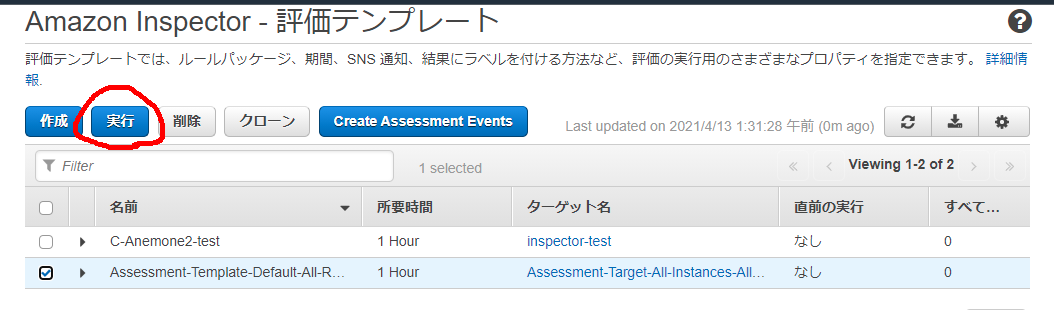
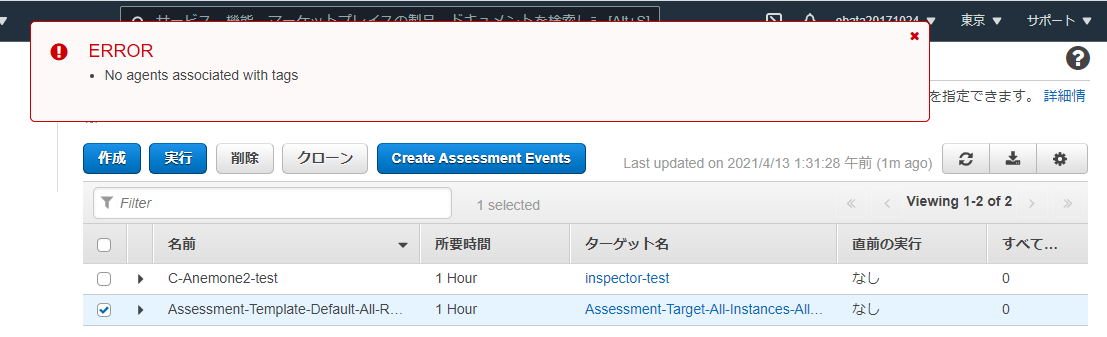
そのまま「実行」を押すと

と失敗するみたいです。

====

調べてみると「Amazon Lightsail は AWSのEC2と同じ扱いはできない」てな記載があったので、ここは大人しく引き下がることにしました。

私が間違っていることを知っている方は、御一報頂ければ幸いです。

E-mailはこちら(スパム対策)

2021/01,江端さんの技術メモ

助けて頂いた資料: 

 Proxy環境でdockerを外に繋ぐ方法 

今、困っていること

Goが動かん。下記(1)~(4)をやっても、

package main

import "fmt"

func main(){
     fmt.Printf("Hello world\n")
}

以下のエラーが出てきて取れない。(なんだこれ?)

$ go run hello.go
go: github.com/go-chi/jwtauth@v4.0.2+incompatible: reading github.com/go-chi/jwtauth/go.mod at revision v4.0.2: unknown revision v4.0.2
このメージを読んで頂いたプログラミングの師匠のSさんに、"go mod vendor" を試すようにアドバイスさました。以下、その挑戦の経緯を記載します。
ubuntu@ip-57:~/codes/hailing_go/docker/app$ go run hello.go
go: github.com/go-chi/jwtauth@v4.0.2+incompatible: reading github.com/go-chi/jwtauth/go.mod at revision v4.0.2: unknown revision v4.0.2
やっぱりダメかなぁ(ちなみに、~/hello.go なら、サクっと動く)
ubuntu@ip-57:~/codes/hailing_go/docker/app$ go mod vendor
go: github.com/go-chi/jwtauth@v4.0.2+incompatible: reading github.com/go-chi/jwtauth/go.mod at revision v4.0.2: unknown revision v4.0.2
これもダメかぁ
ubuntu@ip-57:~/codes/hailing_go/docker/app$ go mod download
go: github.com/go-chi/jwtauth@v4.0.2+incompatible: reading github.com/go-chi/jwtauth/go.mod at revision v4.0.2: unknown revision v4.0.2
(手あたり次第モードになってきた・・・)
ubuntu@ip-57:~/codes/hailing_go/docker/app$ go mod init
go: cannot determine module path for source directory /home/ubuntu/codes/hailing_go/docker/app (outside GOPATH, module path must be specified)
Example usage:
'go mod init example.com/m' to initialize a v0 or v1 module
'go mod init example.com/m/v2' to initialize a v2 module
Run 'go help mod init' for more information.
(手あたり次第モードが進む)
ubuntu@ip-57:~/codes/hailing_go/docker/app$ go run hello.go
go: github.com/go-chi/jwtauth@v4.0.2+incompatible: reading github.com/go-chi/jwtauth/go.mod at revision v4.0.2: unknown revision v4.0.2
やっぱりダメかぁ
ubuntu@ip-57:~/codes/hailing_go/docker/app$ go mod github.com/go-chi/jwtauth/go.mod
go mod github.com/go-chi/jwtauth/go.mod: unknown command
そりゃ、だめだよなぁ
ubuntu@ip-57:~/codes/hailing_go/docker/app$ go mod verify
go: github.com/go-chi/jwtauth@v4.0.2+incompatible: reading github.com/go-chi/jwtauth/go.mod at revision v4.0.2: unknown revision v4.0.2
ubuntu@ip-57:~/codes/hailing_go/docker/app$ go mod why
go: github.com/go-chi/jwtauth@v4.0.2+incompatible: reading github.com/go-chi/jwtauth/go.mod at revision v4.0.2: unknown revision v4.0.2
ubuntu@ip-57:~/codes/hailing_go/docker/app$ go mod init m
go: creating new go.mod: module m
あれ、ググったコマンドを適当に入力したら、"m"というモジュールができてしまったらしい。変なモジュール作ってしまって、やばくないか?
ubuntu@ip-57:~/codes/hailing_go/docker/app$ go run hello.go
go: finding github.com/go-chi/jwtauth v4.0.4+incompatible
go: downloading github.com/go-chi/jwtauth v4.0.4+incompatible
go: extracting github.com/go-chi/jwtauth v4.0.4+incompatible
go: finding github.com/dgrijalva/jwt-go v3.2.0+incompatible
go: downloading github.com/dgrijalva/jwt-go v3.2.0+incompatible
go: extracting github.com/dgrijalva/jwt-go v3.2.0+incompatible
Hello world
あれ、モジュールが自動的にインストールされて,"hello.go"が動いてしまった・・・
この話、実は続続きがある・・・
https://wp2.fem.jp/%e6%9c%aa%e5%88%86%e9%a1%9e/post-2156/

(とりあえず、ここまで)

試行錯誤で分った事項

(1)/etc/apt/apt.conf を作る

Acquire::http::Proxy "http://12.34.56.789:8080";
Acquire::https::Proxy "http://12.34.56.789:8080"; // (×https://)
Acquire::ftp::Proxy "ftp://12.34.56.789:8080";

(2)/etc/systemd/system/docker.service.d/http-proxy.confを作る

/etc/systemd/system/docker.service.d/http-proxy.conf を力づくで作った(最初はなかった(みたい))。

修正前:

[Service]
Environment="HTTP_PROXY=http://12.34.56.789:8080/" "HTTPS_PROXY=https://12.34.56.789:8080" "NO_PROXY=localhost,127.0.0.1,.12.34.56.789"

修正後:

[Service]
Environment="HTTP_PROXY=http://12.34.56.789:8080/" "HTTPS_PROXY=http://12.34.56.789:8080" "NO_PROXY=localhost,127.0.0.1,.12.34.56.789"

(なんのことはない、HTTPS_PROXY の "https:"→"http:" としただけ。ただし、これは、個々の環境に依存する問題だと思う)

(3)関係のありそうな"Dockerfile"に片っ端から、以下を書き込む(関係ありそうなファイルは2つ。hitachi_ride_hailing_go/docker/postgis-pgrouting/Dockerfile
hitachi_ride_hailing_go/docker/app/Dockerfile)

ENV http_proxy http://12.34.56.789:8080
ENV https_proxy http://12.34.56.789:8080

(一番最初の”RUN”の前に書き込んでおくとよい)

(4)シェルに以下を書き込んでおく(設定方法は後で調べる)

export http="http://12.34.56.789:8080"
export https="http://12.34.56.789:8080"